Writing · MARGIN NOTESTiming
Debounce vs Throttle in JavaScript: Which One Fires When?
Debounce vs throttle in JavaScript, built from scratch: debounce waits for quiet, throttle keeps a steady beat. Runnable code, edges, and the interview answer.
- Author
- Nicola Riker Urdaneta
- Published
- October 27, 2026
- Reading time
- 12 min read
Contents
TL;DR
Debounce vs throttle in JavaScript comes down to one question: do you want the last call after things calm down, or a steady stream of calls while things keep happening?
- Debounce waits until calls stop for
waitms, then runs once with the latest arguments. Use it for a search input, autosave, or validation. - Throttle runs at most once per
waitms while calls keep coming. Use it for scroll, resize, and drag work that should keep updating. - Both are about 15 lines on top of
setTimeoutand a closure. Interviews probe the edges (leading vs trailing),cancelandflush, and keepingthisintact.
Why interviewers ask
"Implement debounce" is a familiar front-end interview prompt, often preceded by "what is the difference between debounce and throttle?" It looks like a utility question. It is really a test of three things: closures (the timer id lives between calls), the event loop (setTimeout callbacks run later, on their own task), and this binding (the wrapper must forward the caller's context).
It also maps to a real bug. Browsers fire some events far faster than your code needs. In David Corbacho's tests for his CSS-Tricks article, scrolling with a trackpad or wheel "can trigger easily 30 events per second," and slow scrolling on a smartphone triggered "as much as 100 events per second." Send a network request or recompute layout on every one of those and the page stutters.
Debounce vs throttle in JavaScript, in one picture
MDN puts the difference in one sentence: when calls happen continuously, throttling "ensures that the operation is still performed at a certain maximum rate, while debouncing waits indefinitely until the invocations stop for a certain amount of time."
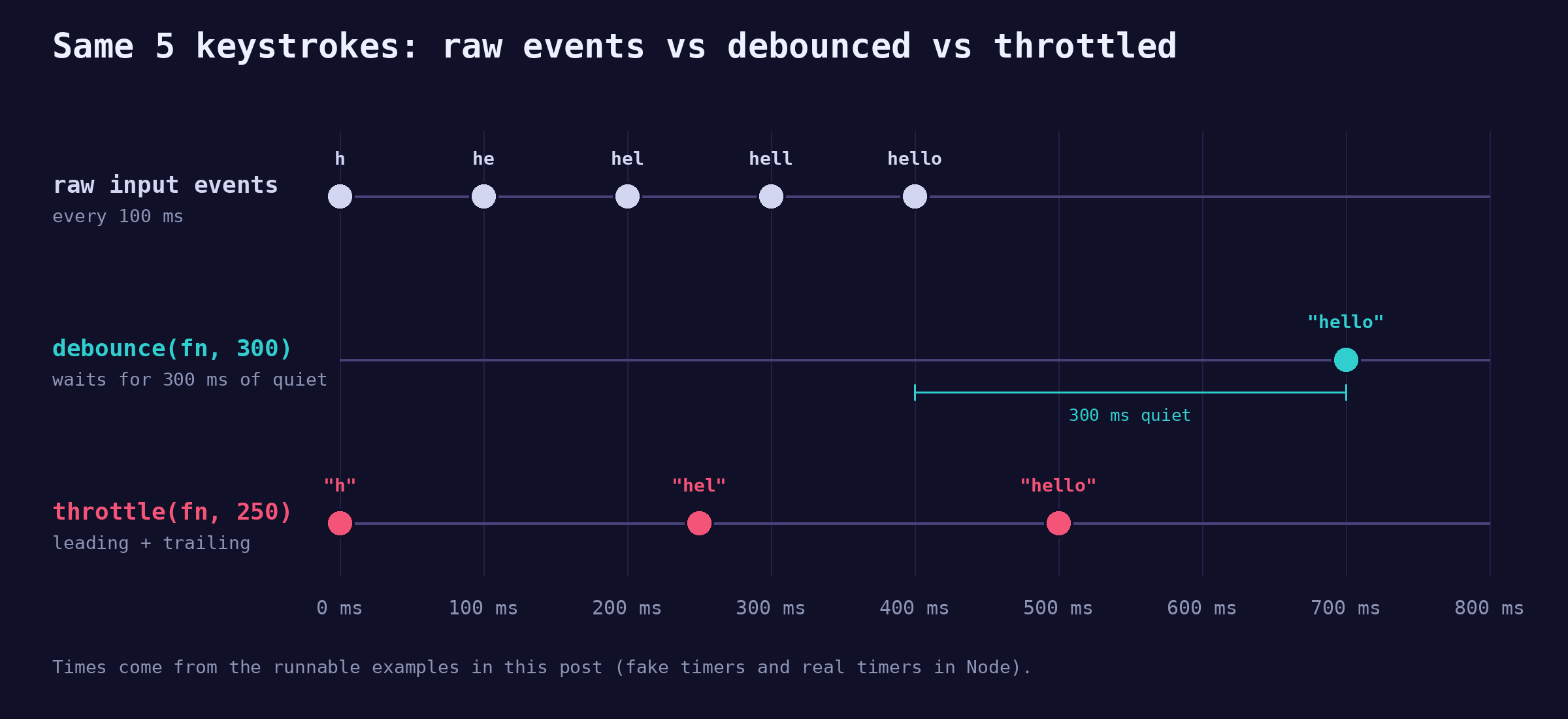
Five keystrokes arrive 100 ms apart. The debounced handler (300 ms) fires once, 300 ms after the last key. The throttled handler (250 ms) fires right away, then every 250 ms, and once more at the end so the final value is not lost.
How do you implement debounce from scratch?
A debounce keeps one timer in a closure. Every call cancels the pending timer and starts a new one. Only the call that survives a full quiet period gets to run.
Every name in this post's code is unique, so you can paste the blocks one after another into one console or file. Blocks that call debounce or throttle without defining them, including the DOM examples, use the full versions from the leading vs trailing section. renderResults, loadNextPage, redrawChart, and recalculateLayout are placeholders for your own app code.
function simpleDebounce(fn, wait) {
  let timerId;
  return function debounced(...args) {
    clearTimeout(timerId);
    timerId = setTimeout(() => fn.apply(this, args), wait);
  };
}

const search = simpleDebounce((query) => console.log("search:", query), 300);

// Simulate typing "hello", one key every 100 ms
["h", "he", "hel", "hell", "hello"].forEach((text, i) => {
  setTimeout(() => search(text), i * 100);
});
// => search: hello
// (logs once, about 300 ms after the last key)
Three details carry the whole answer:
timerIdlives in the closure, so every call todebouncedsees the same timer. That is the closure doing the work.- The arrow function inside
setTimeoutkeeps thethisandargsof the call that scheduled it, andfn.apply(this, args)forwards both. clearTimeouton an id that already fired, or onundefined, is a harmless no-op, so the first call needs no special case.
This matches the contract lodash documents for _.debounce: it "delays invoking func until after wait milliseconds have elapsed since the last time the debounced function was invoked."
How do you implement throttle from scratch?
A throttle remembers when it last ran. If enough time has passed, it runs now. Otherwise it drops the call.
function leadingThrottle(fn, wait) {
  let last = -Infinity;
  return function throttled(...args) {
    const now = Date.now();
    if (now - last >= wait) {
      last = now;
      fn.apply(this, args);
    }
  };
}

const trackLeading = leadingThrottle((text) => console.log("track:", text), 250);

["h", "he", "hel", "hell", "hello"].forEach((text, i) => {
  setTimeout(() => trackLeading(text), i * 100);
});
// => track: h
// => track: hell
// ("hello" at 400 ms is dropped: only 100 ms since the last run)
This leading-only throttle is a fine first answer, and it is exactly where an interviewer pushes: the last value never arrives. On a scroll handler, your sticky header would use a position the user already left. The fix is a trailing edge.
Leading vs trailing: which edge fires?
The leading edge is the first call of a burst. The trailing edge is the end of the wait window. MDN's Debounce and Throttle entries use exactly these terms, and lodash exposes them as options with different defaults: _.debounce defaults to leading: false, trailing: true, and _.throttle defaults to leading: true, trailing: true.
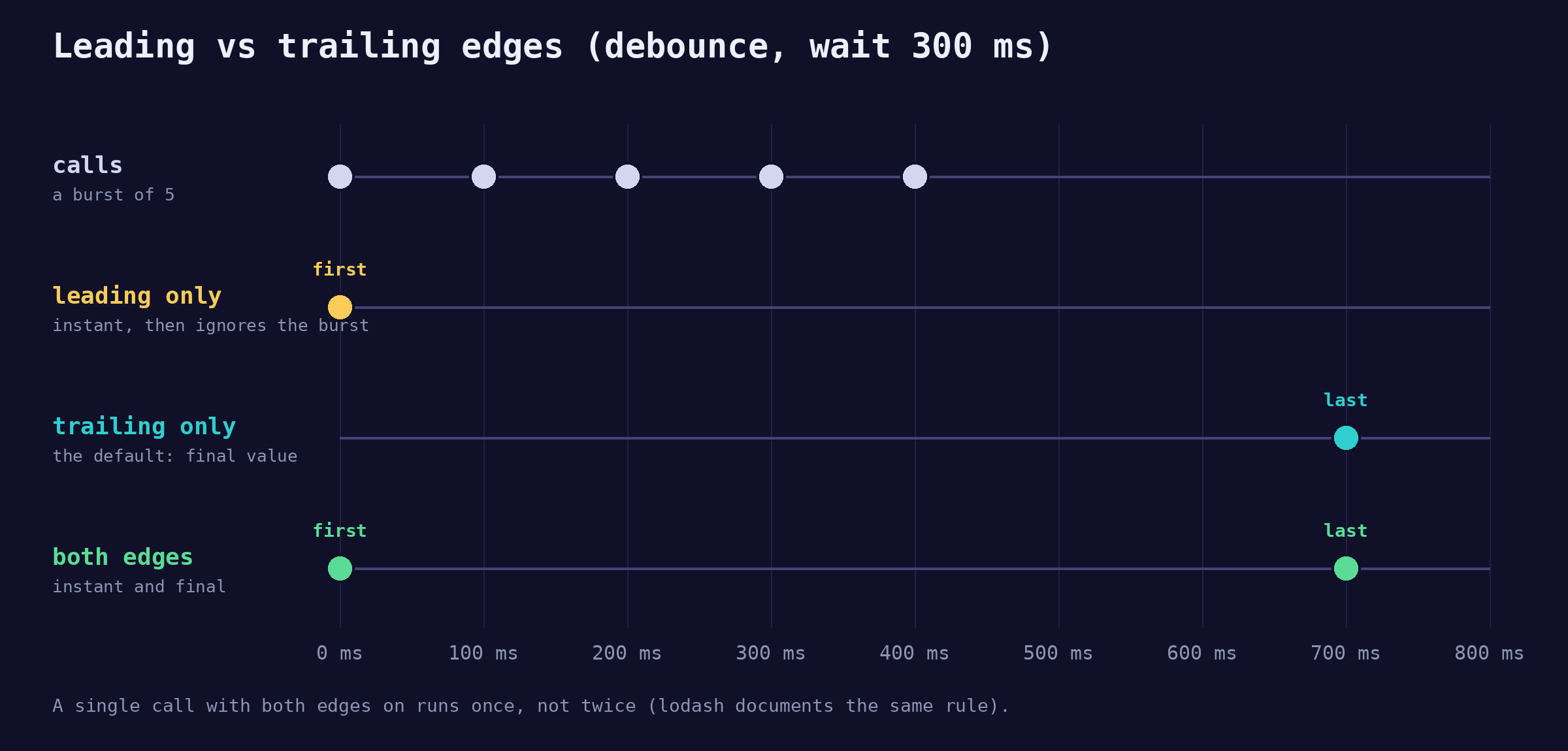
Here is the full throttle, which fires on both edges and is the version the later examples use. Each call stores the latest arguments, and if it is too early to run, it schedules exactly one trailing run for when the window ends.
function throttle(fn, wait) {
  let last = -Infinity;
  let timerId = null;
  let lastArgs = null;
  let lastThis = null;

  function invoke() {
    last = Date.now();
    timerId = null;
    const args = lastArgs;
    const ctx = lastThis;
    lastArgs = lastThis = null;
    fn.apply(ctx, args);
  }

  return function throttled(...args) {
    lastArgs = args;
    lastThis = this;
    const remaining = wait - (Date.now() - last);
    if (remaining <= 0) {
      clearTimeout(timerId);
      invoke(); // leading edge: enough time has passed, run now
    } else if (timerId === null) {
      timerId = setTimeout(invoke, remaining); // trailing edge: run when the window ends
    }
  };
}

const trackBoth = throttle((text) => console.log("track:", text), 250);

["h", "he", "hel", "hell", "hello"].forEach((text, i) => {
  setTimeout(() => trackBoth(text), i * 100);
});
// => track: h
// => track: hel
// => track: hello
The trailing run at 250 ms uses "hel", not "he", because later arguments replace earlier ones inside a window. Lodash's _.throttle with its defaults produces the same three values for this input (its last call lands at 550 ms instead of 500, because after each run lodash starts a fresh full wait timer at the next call: 300 + 250).
A debounce can take the same options. Here is the full debounce, with leading, trailing, cancel, and flush, which the next sections use:
function debounce(fn, wait, { leading = false, trailing = true } = {}) {
  let timerId = null;
  let lastArgs = null;
  let lastThis = null;

  function invoke() {
    const args = lastArgs;
    const ctx = lastThis;
    lastArgs = lastThis = null;
    fn.apply(ctx, args);
  }

  function debounced(...args) {
    const startsBurst = timerId === null;
    lastArgs = args;
    lastThis = this;
    clearTimeout(timerId);
    timerId = setTimeout(() => {
      timerId = null;
      if (trailing && lastArgs) invoke();
    }, wait);
    if (leading && startsBurst) invoke(); // leading edge
  }

  debounced.cancel = () => {
    clearTimeout(timerId);
    timerId = null;
    lastArgs = lastThis = null;
  };

  debounced.flush = () => {
    if (timerId === null) return;
    clearTimeout(timerId);
    timerId = null;
    if (lastArgs) invoke();
  };

  return debounced;
}

const both = debounce((t) => console.log("both:", t), 300, { leading: true });
const leadingOnly = debounce((t) => console.log("leading:", t), 300, {
  leading: true,
  trailing: false,
});

["h", "he", "hel", "hell", "hello"].forEach((text, i) => {
  setTimeout(() => {
    both(text);
    leadingOnly(text);
  }, i * 100);
});
// => both: h
// => leading: h
// => both: hello
Notice that invoke clears lastArgs. That is why a single call with both edges enabled runs once, not twice. Lodash documents the same rule: with both options on, the trailing call only happens "if the debounced function is invoked more than once during the wait timeout."
Real UI case: debounce a search input
Search-as-you-type is the textbook debounce: wait for a pause and send one request.
const input = document.querySelector("#search");
let controller = null;

async function runSearch(query) {
  controller?.abort(); // cancel the previous request if it is still in flight
  controller = new AbortController();
  try {
    const res = await fetch(`/api/search?q=${encodeURIComponent(query)}`, {
      signal: controller.signal,
    });
    renderResults(await res.json());
  } catch (err) {
    if (err.name !== "AbortError") throw err;
  }
}

const debouncedSearch = debounce(runSearch, 300);

input.addEventListener("input", (event) => {
  const query = event.target.value.trim();
  if (query.length < 2) {
    debouncedSearch.cancel(); // nothing worth searching, drop the pending call
    return;
  }
  debouncedSearch(query);
});
// Typing "react" one key every 100 ms:
// => requests sent: 1 (/api/search?q=react)
Two details matter more than the debounce itself:
- Debounce does not fix races. If an older response arrives last, stale results win. The
AbortControllercancels the older request. - Keep the per-key handler cheap. Key presses count toward Interaction to Next Paint, and web.dev rates an INP of 200 milliseconds or less as good. The
inputlistener above does almost nothing per key; the expensive work happens once.
Real UI case: throttle scroll and resize
Infinite scroll is the classic throttle case: check, while the user is still scrolling, whether they are near the bottom. A debounce would wait until they stop, which is too late.
const LOAD_AHEAD_PX = 600; // start loading 600px before the bottom

function checkNearBottom() {
  const { scrollHeight } = document.documentElement;
  const distance = scrollHeight - (window.scrollY + window.innerHeight);
  if (distance < LOAD_AHEAD_PX) loadNextPage();
}

window.addEventListener("scroll", throttle(checkNearBottom, 200));
// Simulated 1 second of scrolling, one scroll event every 16 ms:
// => scroll events: 63, checks: 6
The trailing edge matters here too: the last check runs after the final scroll event, so a user who stops just short of the threshold still gets the next page. For this specific job, IntersectionObserver on a sentinel element avoids the scroll listener entirely.
Resize is the case that tests judgment, because both tools are defensible:
// Redraw a canvas chart live while the user drags the window edge
window.addEventListener("resize", throttle(redrawChart, 100));

// Recompute an expensive layout once, after the user lets go
window.addEventListener("resize", debounce(recalculateLayout, 150));
If the user should see the page adapt during the drag, throttle. If only the final size matters, debounce. Lodash's own _.debounce example is calculateLayout on resize with a 150 ms wait.
Should you throttle with requestAnimationFrame?
requestAnimationFrame is a common follow-up. It runs a callback before the next repaint, and per MDN its rate "will generally match the display refresh rate": 60 Hz is most common, and 75, 120, and 144 Hz are also widely used.
Here is the catch. Browsers already deliver scroll and resize events as part of the rendering steps of the event loop, at most once per frame. MDN's scroll event page says throttling a scroll handler with requestAnimationFrame "is useless because animation frame callbacks are fired at the same rate as scroll event handlers." So rAF won't reduce how often your code runs. To do less work, you need a time-based throttle like the one above.
Use requestAnimationFrame for a different job: lining visual writes up with the next paint. The point of rafThrottle is timing, not less work: a scroll and a resize in the same frame produce one style write, right before the paint.
function rafThrottle(fn) {
  let frameId = null;
  let lastArgs = null;
  let lastThis = null;
  return function throttled(...args) {
    lastArgs = args;
    lastThis = this;
    if (frameId !== null) return;
    frameId = requestAnimationFrame(() => {
      frameId = null;
      fn.apply(lastThis, lastArgs);
    });
  };
}

const bar = document.querySelector(".progress");
const updateProgress = rafThrottle(() => {
  const max = document.documentElement.scrollHeight - window.innerHeight;
  bar.style.transform = `scaleX(${window.scrollY / max})`;
});

window.addEventListener("scroll", updateProgress);
window.addEventListener("resize", updateProgress);
// A scroll and a resize in the same frame:
// => style writes: 1
One more timing fact worth having ready: timers are not exact. MDN's setTimeout page notes that browsers clamp nested timeouts to at least 4 ms after five levels of nesting, and that browsers throttle timers in background tabs (Firefox desktop documents a 1 s minimum). Treat wait as "no sooner than," never "exactly."
Preserving this and arguments
A wrapper that drops this breaks every method you wrap. The versions above return a regular function and call through with apply, so methods keep working:
const searchBox = {
  label: "Search",
  report(value) {
    console.log(`${this.label}: ${value}`);
  },
};

searchBox.report = debounce(searchBox.report, 200);
searchBox.report("closures");
// => Search: closures
Now the version that shows up in a lot of copy-pasted snippets:
function brokenDebounce(fn, wait) {
  let timerId;
  return (...args) => {
    clearTimeout(timerId);
    timerId = setTimeout(() => fn(...args), wait);
  };
}

const box = {
  label: "Search",
  report(value) {
    console.log(`${this.label}: ${value}`);
  },
};

box.report = brokenDebounce(box.report, 200);
box.report("closures");
// In a module (strict mode), 200 ms later:
// => TypeError: Cannot read properties of undefined (reading 'label')
Two bugs stack up. The returned arrow function has no this of its own, so the caller's box is thrown away. And fn(...args) is a plain call, which sets this to undefined in strict mode. If you want the full rule set behind that, the 4 rules for this covers default, implicit, explicit, and new binding.
cancel, flush, and maxWait
cancel drops a pending call. flush runs it now.
const saveDraft = debounce((text) => console.log("saved:", text), 1000);

saveDraft("v1");
saveDraft("v2");
saveDraft.flush(); // => saved: v2
saveDraft("v3");
saveDraft.cancel(); // v3 is dropped, nothing else logs
Where each one belongs:
flushwhen the user is leaving: onvisibilitychangeto hidden, or right before a route change, so the last edit is not lost.cancelwhen the thing that scheduled the call is gone: a component unmounting, or a search box cleared. In React that is the cleanup function of the effect that created the debounced handler.maxWait(a lodash option) when a debounce must not starve. Someone typing nonstop never pauses, so a plain debounce never saves._.debounce(save, 300, { maxWait: 1000 })guarantees a run at least once per second during the burst.
That last option is the bridge between the two ideas. In the lodash source, _.throttle is implemented as _.debounce with maxWait set to wait. A throttle is a debounce that is not allowed to wait longer than one window.
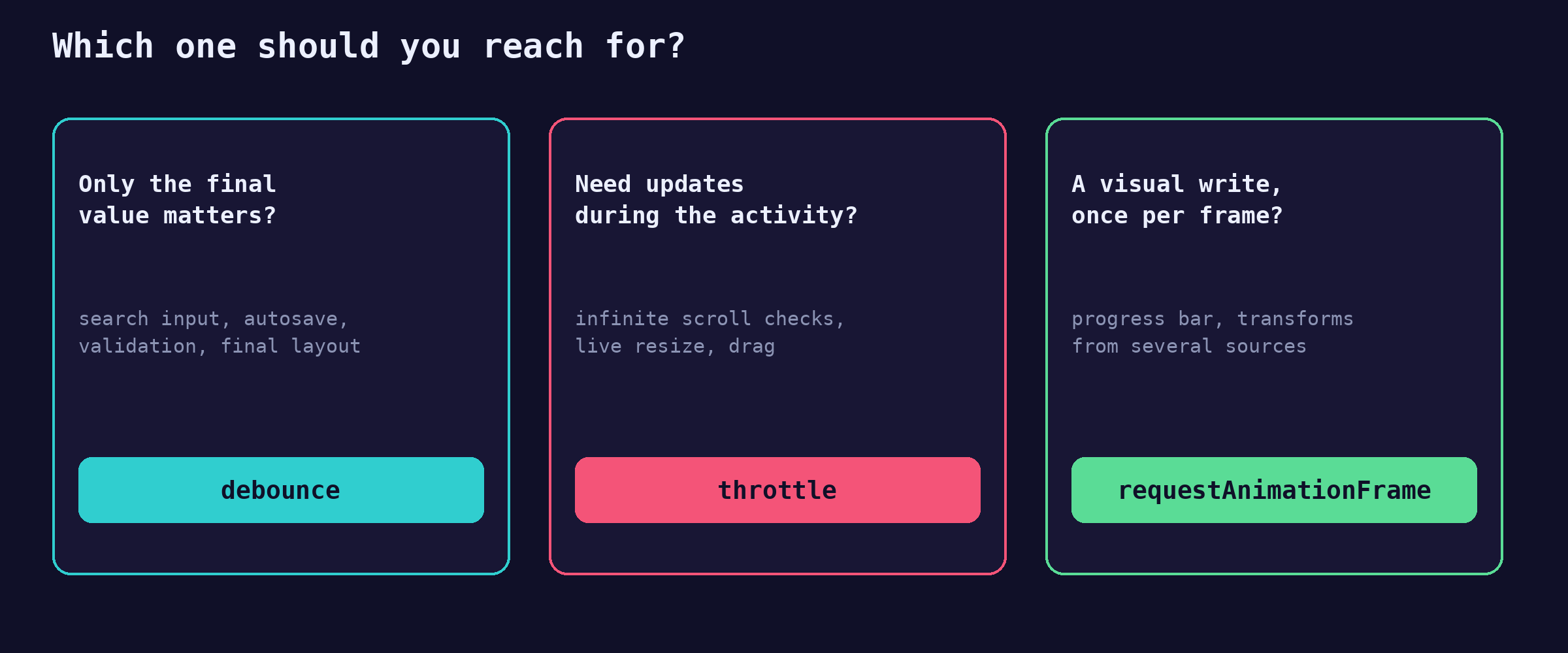
Debounce vs throttle comparison
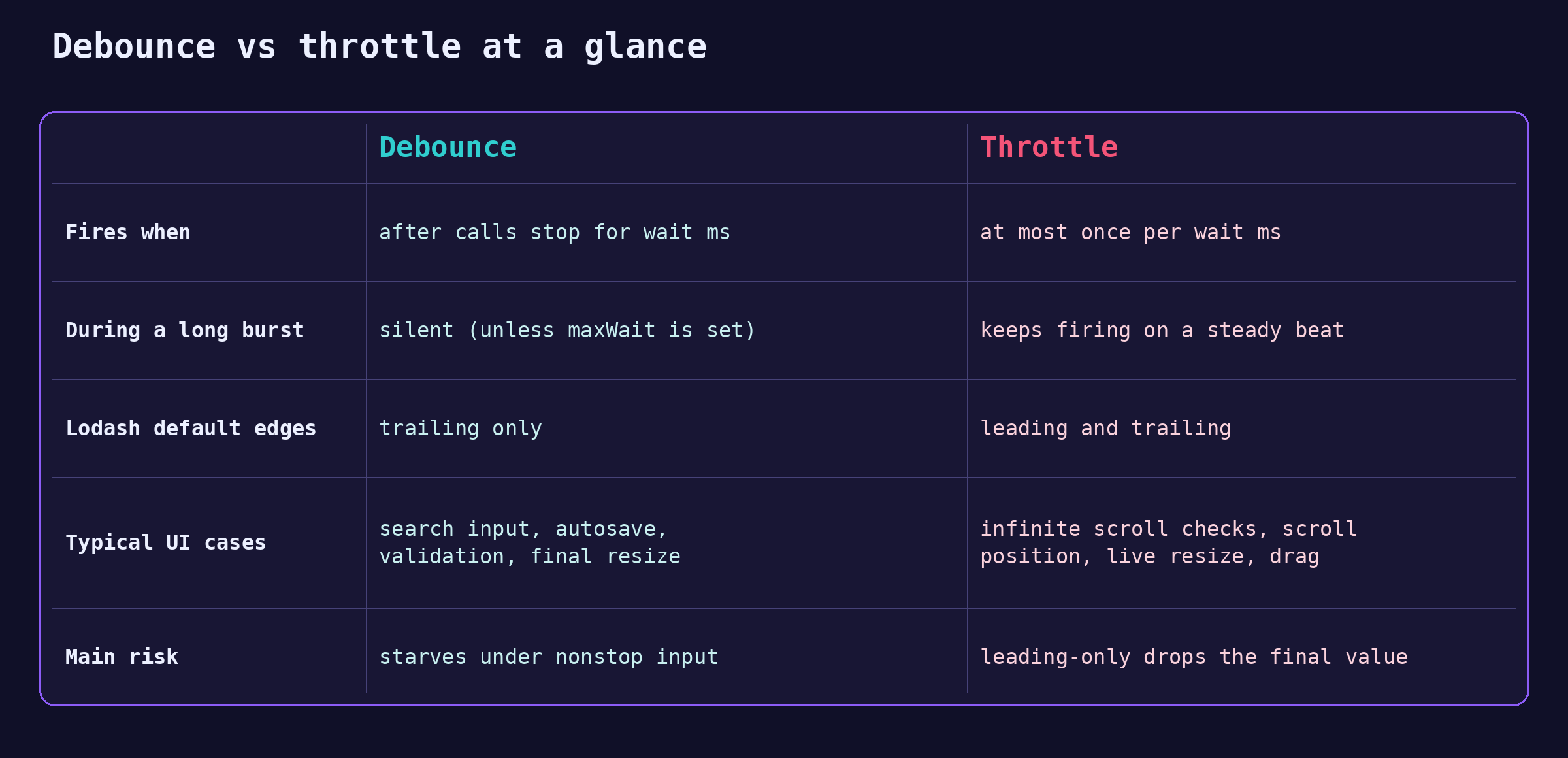
The same comparison in text:
- Fires when: debounce after calls stop for
waitms; throttle at most once perwaitms. - During a long burst: debounce stays silent (unless
maxWaitis set); throttle keeps firing on a steady beat. - Lodash default edges: debounce trailing only; throttle leading and trailing.
- Typical UI cases: debounce for search input, autosave, validation, final resize; throttle for infinite scroll checks, scroll position, live resize, drag.
- Main risk: debounce can starve under continuous input; a leading-only throttle can drop the final value.
What to say out loud in an interview
A strong answer sounds like this:
- Both wrap a function to control how often it runs. Debounce waits for calls to stop for
waitms and runs once with the latest arguments. Throttle runs at most once perwaitms while calls keep coming. - Debounce is for "I only care about the final value": search input, autosave, validation. Throttle is for "keep me updated while this is happening": scroll, resize, drag.
- Debounce is a closure over a timer id; throttle is a closure over the last run time, plus a timer for the trailing call (lodash literally builds
_.throttlefrom_.debouncewithmaxWaitset towait). - Both have leading and trailing edges, and a production version forwards
thisand arguments and exposescancelandflush.
Then write the short debounce and walk the "hello" timeline out loud.
Common wrong answers
- "They are the same thing with different names." No. Under continuous input, a throttle keeps running and a debounce never runs until the input stops.
- "Debounce runs the first call and ignores the rest." That describes a leading-only debounce. The default debounce runs the last call.
- "Use
requestAnimationFrameto cut down scroll work." Scroll already fires at most once per frame, so rAF won't reduce how often your code runs. Use rAF to line visual writes up with the next paint, and use a time-based throttle to do less work. - "Debouncing the search input prevents out-of-order results." No. It reduces requests; it does not order responses. You still need to abort or ignore stale ones.
Follow-up questions interviewers ask
- "Add a leading option." If no timer is pending, the call starts a burst, so run it now. Clear the stored arguments so the trailing edge does not repeat it.
- "How would you cancel or flush?" Attach methods to the returned function.
cancelclears the timer and the stored arguments.flushclears the timer and runs the stored call now. - "What about
requestAnimationFrame?" Scroll already fires at most once per frame, so rAF won't reduce how often your code runs. Use it to line visual writes up with the next paint; use a time-based throttle to do less work. - "Does your version preserve
thisand arguments?" Return a regular function, capturethisandargsat call time, and call through withfn.apply(ctx, args). - "Should it return a value?" A debounced call runs later, so it cannot return the result synchronously. Lodash returns the result of the last invocation; another option is to return a promise that resolves when the call runs.
Key takeaways
- Debounce waits for quiet, then runs once with the latest arguments. Throttle runs at most once per window.
- Both are closures: a timer id for debounce, a last-run time (plus a timer) for throttle.
- Leading edge means instant response; trailing edge means the final value.
cancel,flush, andmaxWaitmake them production tools. Debounce does not fix request races.
My take: write it in the interview, audit it in production
Write debounce and throttle from scratch in an interview, every time: the short version shows closures, timers, and this at once, and that is what is being graded. In client work I don't hand-roll them. I use lodash or a tested team utility, because maxWait, return values, and timer cleanup are where hand-rolled versions slip.
The bugs I see in client code are rarely in the debounce itself. They are lifecycle bugs: a save that never flushes when the tab closes, a search that fires after the component unmounted, a throttled handler recreated on every render. Talk about those and you are answering the question a senior interviewer is really asking.
FAQ
What is the difference between debounce and throttle in JavaScript?
Debounce runs a function once, after calls stop for a set time. Throttle runs it at most once per interval while calls keep coming. For "hello" typed one key every 100 ms, a 300 ms debounce fires once at 700 ms, and a 250 ms throttle fires at 0, 250, and 500 ms (MDN defines both).
Should I debounce or throttle a scroll event?
Throttle it when you need updates during the scroll, such as infinite-scroll checks or scroll position tracking, with a trailing call so the final position is handled. If you only need a single "scrolling stopped" signal, the scrollend event does that natively; MDN marks it Baseline since December 2025.
What do leading and trailing mean in debounce and throttle?
The leading edge is the first call in a burst; the trailing edge is the end of the wait window. Leading gives an instant response, trailing gives the final value. Lodash's _.debounce defaults to trailing only, and _.throttle defaults to both (lodash docs).
Is requestAnimationFrame better than throttle?
They do different jobs. Scroll and resize already fire at most once per frame, so requestAnimationFrame won't reduce how often your code runs. Use rAF to line visual writes up with the next paint, and use a time-based throttle, such as 100 to 200 ms, to do less work.
Hire Nicola to build your app
Nicola builds apps for clients: scoping the work, shaping the experience, and shipping front-end systems that stay fast when users type, scroll, and resize. See pricing or get in touch if you have a product, site, or front-end system in mind.
About the author
Nicola Riker is an Awwwards-nominated design engineer based in Colorado Springs. Nicola builds apps for clients, from planning and design through shipped code.
Keep going: closures (the timer id), the event loop (when timers run), the 4 rules for this, hoisting and the TDZ, promises and async/await, and prototypes.