Case Study · Project Detail
Creating Interactive Data Visualizations with D3.js
A set of interactive D3.js visualizations — bar charts, scatter plots, and treemaps — exploring data-binding, scales, and smooth transitions.
Year
2023
Status
Completed
Category
Simple Project
Client
Riker Web
Technologies
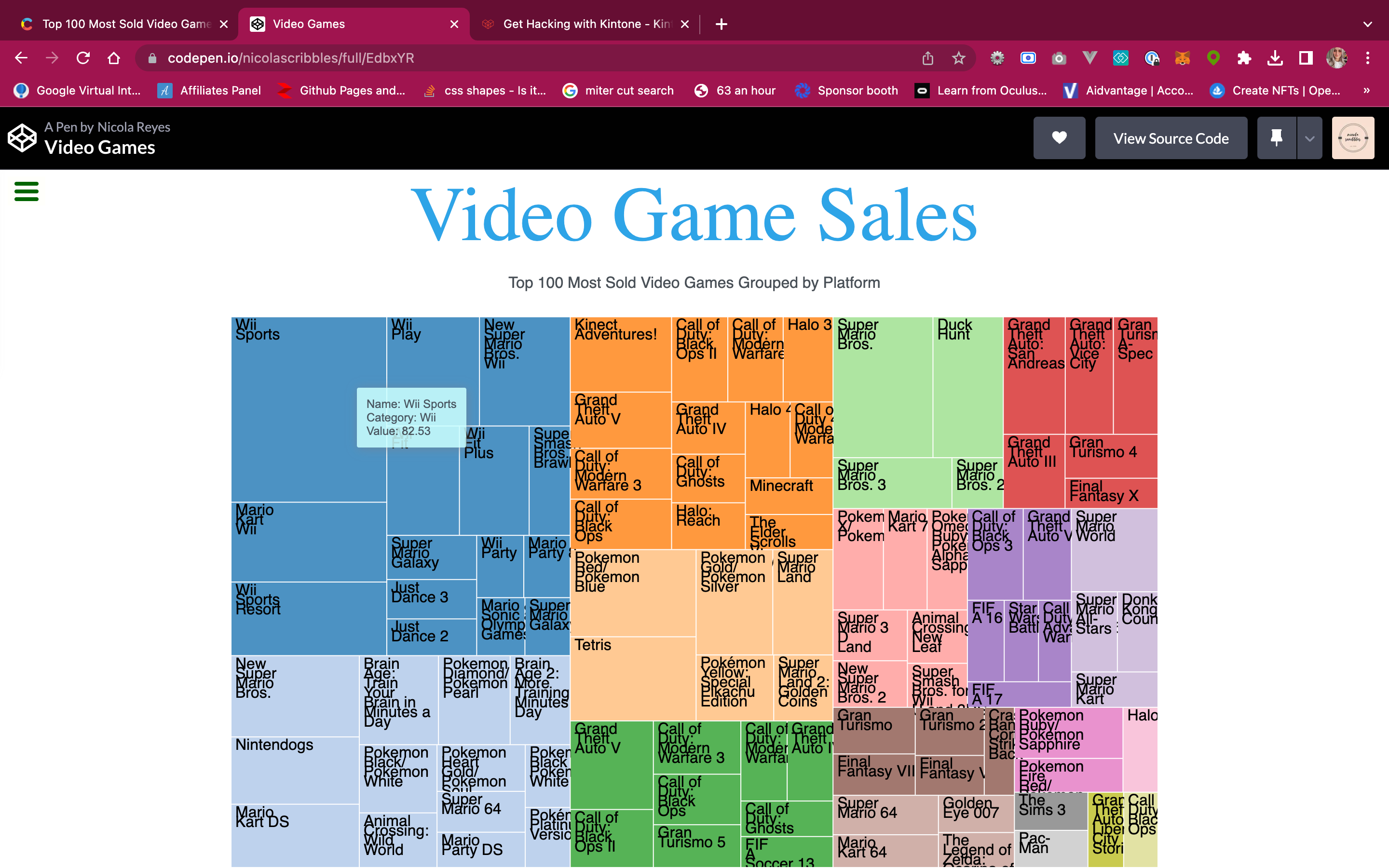
Fig. 01 · Hero Image · Click to enlarge
Case Study · NOTES
If you want to create interactive and dynamic data visualizations in the browser, D3.js is the library for you. This powerful JavaScript library allows you to transform data into different charts, graphs, and maps. With its support for common web standards, such as HTML, CSS, and SVG, D3.js is the perfect tool for building data-driven documents.
I took a class on Data Visualization with D3 and built a project using the library. In this project, I used D3 to create a tree map that displays the top 100 most sold video games grouped by platform. You can check out the project here (link to your project).
To build this project, I first imported the D3 library into my JavaScript file. I then defined the body and tooltip of the tree map. Next, I defined the size, padding, and color of the tree map using the treemap function. Finally, I used the d3.json method to load the data and create the tree map.One of the most useful features of D3 is its ability to support many different kinds of input data formats. In my project, I used a JSON file that contains the data for the top 100 most sold video games grouped by platform. I then transformed this data into a tree map using D3's built-in methods.
The tree map that I created displays the video games by platform, with each platform represented by a rectangle. The size of each rectangle corresponds to the number of sales for the video games on that platform. Hovering over each rectangle displays a tooltip that shows the name of the video game, the platform it's on, and the number of sales.
Overall, I had a great experience working with D3.js to create this tree map. If you're interested in creating interactive and dynamic data visualizations, I highly recommend giving D3.js a try. With its powerful built-in methods and support for common web standards, D3.js is the perfect tool for building data-driven documents.